The start should be configured roughly as follows for standard events. [Optional] items can be an empty or removed, extra blank minutes can also inserted if needed. The minutes can be demarked by stakes or taped boxes, for Saturday series and Level D, just placing the controls is enough. Most large events and those with multiple starts will have a dedicated plan dictated by the start team leader.
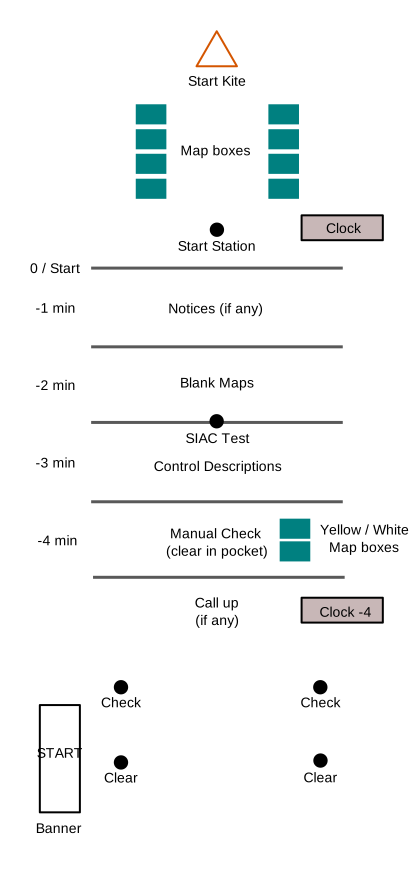
- Start Kite- Visible from start line, otherwise a taped route.
- Map boxes (except Yellow and White)
- Start punch – If a timed start this should only be for late starters and managed by a volunteer
- 0 min / Start line – Visible race clock with race time [Clock optional for Sat Series / level D].
- -1 min – Any notices if provided. Can put notices earlier with another box for low level events.
- -2 min – Blank Map display [and any map corrections]
- [Optional] SIAC Test (not required for sat series)
- -3 min – [Optional] Control descriptions, same ordering as map boxes.
- -4 min – Manual check ( can supervise staked check controls at Saturday Series / Level D)
Map boxes for Yellow and White courses. - [Optional] Call up, visible clock with callup time
- Check – Controls on stake at entry to start boxes.
- Clear – use a couple spaced back to prevent crowding of boxes.
- Start banner – near the clear controls.
View online

Packing up
All controls used in the start should be returned to download as soon as reasonably possible for safety checks. Keep them separate from unused units for convenience.
In most cases everything bar the start kite (it is a reference on the map) can be packed away once the start window ends.